pomodoro-timer-with-game
🍅 Pomodoro Timer
A clean, installable Pomodoro focus timer built with vanilla HTML, CSS, and JavaScript — no frameworks, no build step. Every file is thoroughly commented to make the code easy to follow and learn from. Track your tasks, build a study streak, play ambient sounds, and stay focused.
一个干净简洁、可安装的番茄钟,用纯前端技术(HTML / CSS / JavaScript)从零打造,没有使用任何框架,也无需构建步骤。每个文件都配有详细注释,方便阅读和学习。管理任务清单、累积专注天数、播放环境音,帮你保持专注。
🔗 Live demo / 在线体验: https://vv0611.github.io/pomodoro-timer-with-game/timer.html
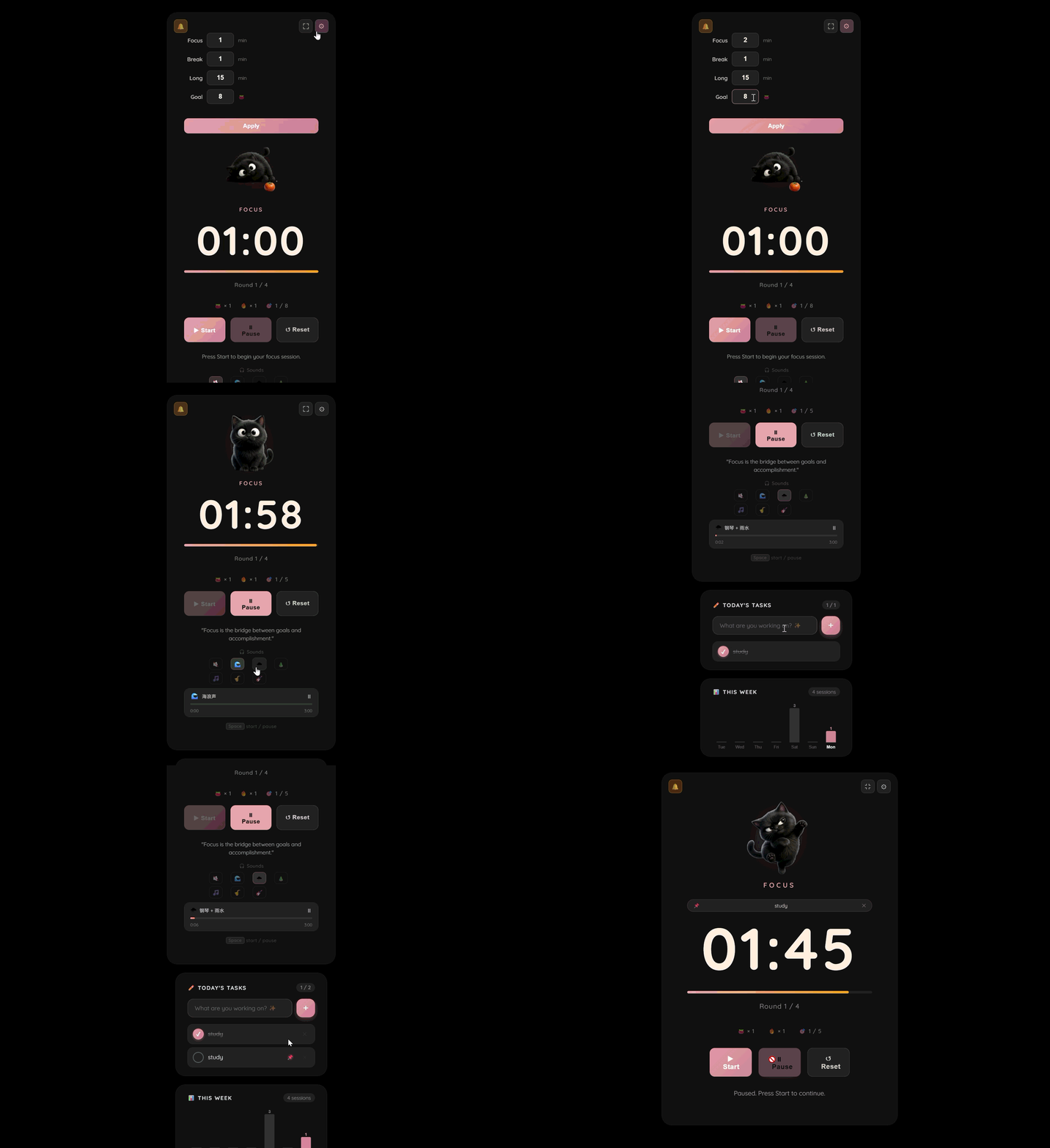
📷 Screenshots / 截图

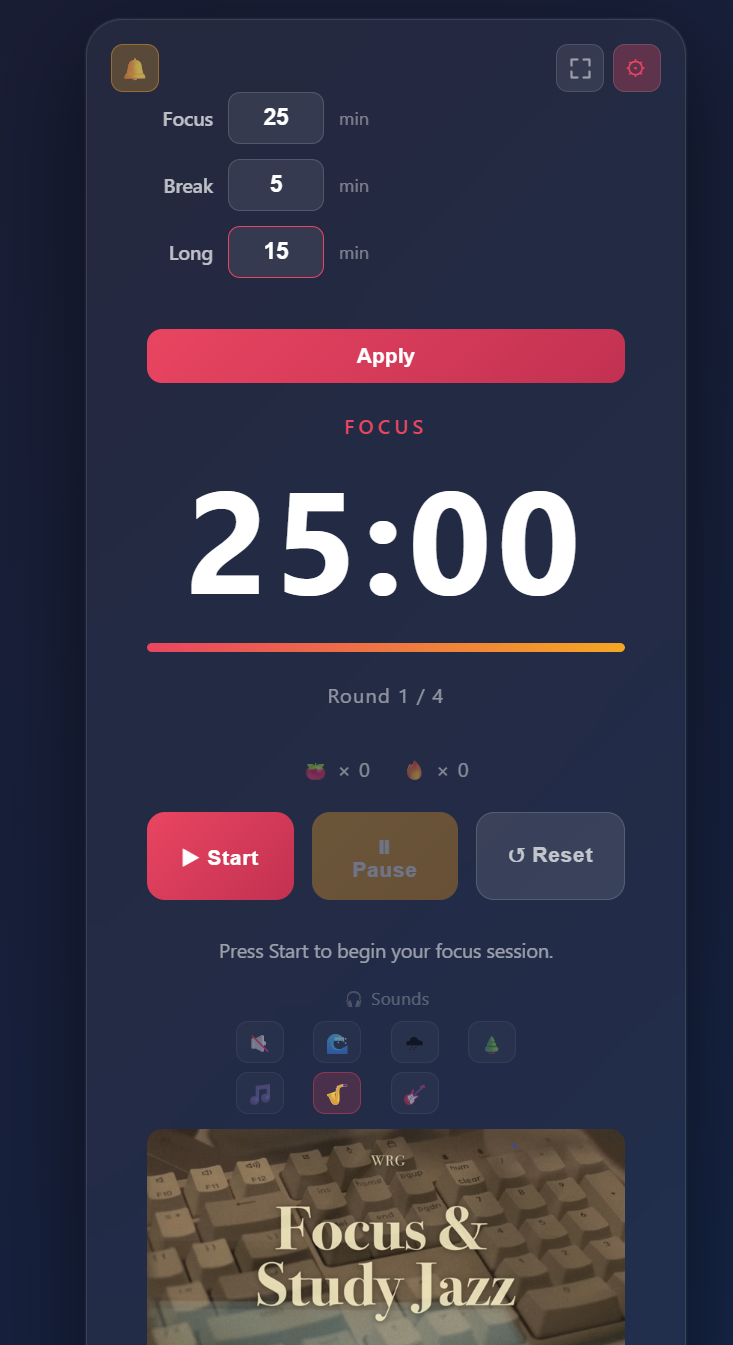
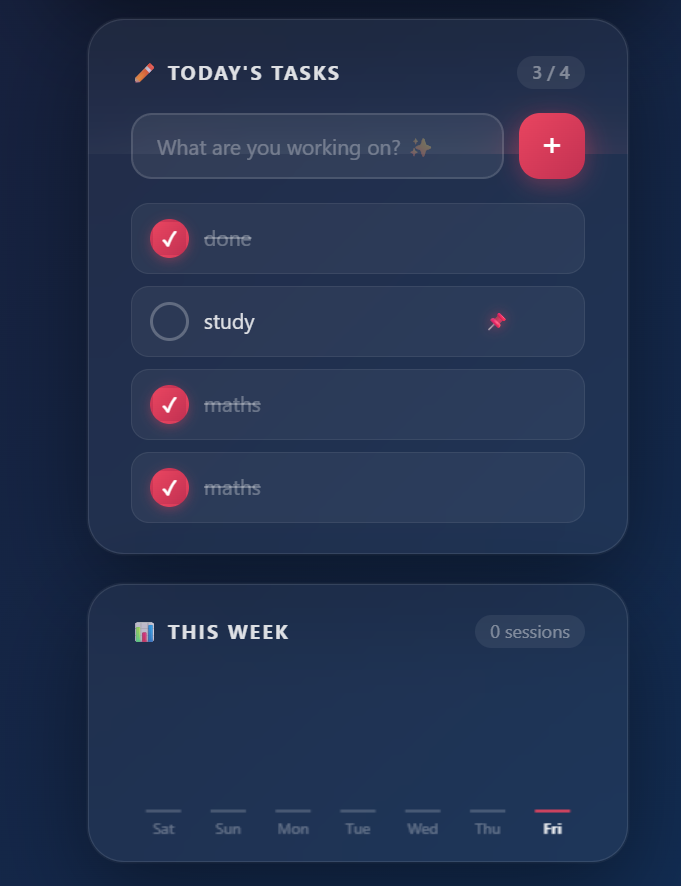
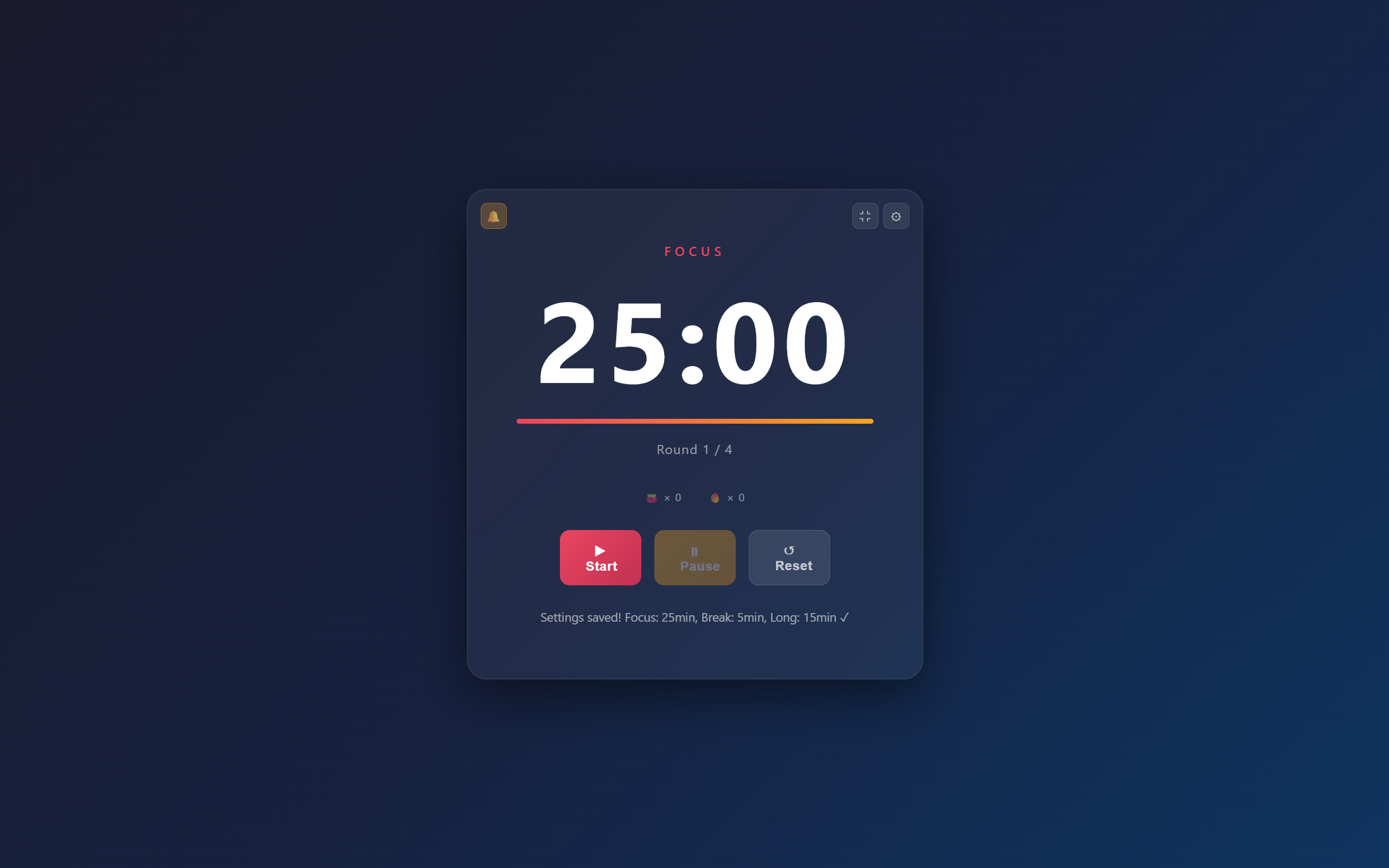
✨ Features / 功能
Core timer
- Focus / short break / long break cycle (4 rounds, with a longer break after round 4)
- Fully customizable durations — set your own focus / break / long-break minutes
- Color themes shift between focus, break, and long-break modes
- Live countdown shown in the browser tab title, so you can track time from another tab
Stay on track
- 📌 Task list — add tasks and pin one as the active task; it auto-completes when the focus session ends
- 🔥 Daily streak counter — rewards consecutive days of studying
- 📊 7-day stats bar chart — see how many pomodoros you’ve completed each day
Atmosphere & alerts
- 🎵 Ambient sounds (ocean, rain, forest, lo-fi, jazz × 2) — local MP3 files, no ads, no internet required _** Changes from version 1
- 🔔 3-note chime when a session ends — ascending arpeggio for focus complete, descending for break complete; generated live with the Web Audio API, no audio files needed
- 🖥️ Desktop notifications when a session finishes — an in-page banner asks for permission on your very first visit
- ⛶ Fullscreen focus mode
Works like an app
- 📲 Installable PWA — add it to your home screen or desktop
- 🔌 Works fully offline thanks to a service worker
- 💾 Settings, tasks, streaks, and stats all persist via
localStorage
核心计时
- 专注 / 短休息 / 长休息循环(4 轮一组,第 4 轮后进入更长的休息)
- 时长完全可自定义 —— 自己设定专注 / 短休息 / 长休息的分钟数
- 专注、休息、长休息三种模式各有不同配色
- 浏览器标签页标题实时显示倒计时,切到别的标签页也能看到剩余时间
保持专注
- 📌 任务清单 —— 添加任务并置顶一个作为当前任务,专注结束后自动标记完成
- 🔥 每日连续天数 —— 奖励你坚持学习的连续天数
- 📊 近 7 天统计柱状图 —— 直观看到每天完成了多少个番茄钟
氛围与提醒
- 🎵 环境音(海浪、雨声、森林、Lo-fi、爵士 × 2) —— 本地 MP3 文件,无广告,无需联网 (**从第一版本更改)
- 🔔 一段结束时播放三音琶音提示 —— 专注结束为上行三音,休息结束为下行两音;用 Web Audio API 实时生成,无需任何音频文件
- 🖥️ 一段结束时弹出桌面通知 —— 首次进入页面时自动显示权限横幅,一键开启
- ⛶ 全屏专注模式
像 App 一样使用
- 📲 可安装的 PWA —— 可添加到主屏幕或桌面
- 🔌 借助 Service Worker 完全离线可用
- 💾 设置、任务、连续天数、统计数据全部通过
localStorage持久化保存
🛠️ Technical highlights / 技术亮点
A few details worth a closer look if you’re here to learn:
- Drift-proof timing. Instead of counting down with
setIntervaland subtracting one second per tick (which drifts over time and gets throttled when the tab is in the background), the timer anchors to a target end timestamp and recomputes the remaining time fromDate.now()on every tick. Switch tabs for 25 minutes and come back — it’s still accurate. - Sound without files. Session-end alerts are synthesized at runtime with the Web Audio API — an oscillator plus a gain node, with a smooth fade-out to avoid the click/pop you’d get from cutting a tone off abruptly.
- Offline-first PWA. A service worker pre-caches the app shell on install and serves it cache-first, so the timer keeps working with no internet. Old caches are cleaned up on activation via a versioned cache name.
- No framework, on purpose. Everything is plain DOM APIs and
localStorage— a good way to see how the pieces actually fit together without a library doing the work for you.
如果你是来学习的,这几个细节值得细看:
- 防漂移计时。 没有用
setInterval每秒减一(这种方式会随时间累积误差,标签页切到后台时还会被浏览器节流),而是锚定一个目标结束时间戳,每次 tick 都用Date.now()重新计算剩余时间。切去别的标签页 25 分钟再回来,计时依然准确。 - 不依赖音频文件的提示音。 结束提示音是用 Web Audio API 实时合成的 —— 一个振荡器加一个增益节点,并做了平滑淡出,避免音调被突然切断产生的”咔哒”爆音。
- 离线优先的 PWA。 Service Worker 在安装时预缓存应用文件,并采用缓存优先策略,所以没网也能正常运行。旧缓存通过带版本号的缓存名在激活时自动清理。
- 刻意不用框架。 全部基于原生 DOM API 和
localStorage—— 没有框架代劳,正好能看清各部分是如何真正拼在一起的。
📦 Tech stack / 技术栈
- HTML5
- CSS3 (gradients, flexbox, theme switching via body classes / 渐变、flexbox、通过 body class 切换主题)
- Vanilla JavaScript (ES6+)
- Web Audio API · Notifications API · Fullscreen API
- Service Worker + Web App Manifest (PWA)
localStoragefor persistence / 用于数据持久化
🚀 Run locally / 本地运行
Because it uses a service worker, open it through a local server (not by double-clicking the file). 因为用到了 Service Worker,请通过本地服务器打开(不要直接双击文件)。
# 1. Clone the repo / 克隆仓库
git clone https://github.com/VV0611/pomodoro-timer.git
cd pomodoro-timer

# 2. Start any static server, e.g. with Python / 启动一个静态服务器,例如用 Python:
python -m http.server 5500

# 3. Open in your browser / 在浏览器打开:
#    http://localhost:5500/timer.html
Using VS Code? The Live Server extension works great — right-click
timer.html→ “Open with Live Server”. 用 VS Code 的话?装 Live Server 扩展很方便 —— 右键timer.html→ “Open with Live Server”。
📁 Project structure / 文件结构
pomodoro-timer/
├── timer.html      # Markup / app structure  ·  页面结构
├── timer.css       # Styles & theme          ·  样式与主题
├── timer.js        # All the timer logic      ·  全部计时逻辑
├── sw.js           # Service worker (offline) ·  Service Worker(离线缓存)
├── manifest.json   # PWA manifest             ·  PWA 配置清单
├── icon.png        # App icon (512×512 PNG)   ·  应用图标
└── cats/           # State-driven cat images (PNG, transparent bg)  ·  状态驱动猫咪图片(透明背景 PNG)
    ├── idle-cat.png
    ├── focus-cat.png
    ├── paused-cat.png
    ├── shortbreak-cat.png
    ├── longbreak-cat.png
    └── done-cat.png
🔄 Changelog / 更新记录
v5.1 — 2026-06-22
Cat Companion polish / 猫咪伴侣细节改善
- Coin earn rate raised to 3 coins / minute of focus time (was 1)
- Feed and Play buttons now show their coin cost in the label (
🍖 Feed · 🪙10,🎾 Play · 🪙N) - Stat bars turn amber when a stat drops below 25 and red + pulse when below 10
- ✏️ Rename button next to the cat’s name — click to set a custom name (up to 20 chars), saved to
petState - 金币获取速率提升为每专注分钟 3 枚(原为 1 枚)
- 喂食和玩耍按钮标签现在显示金币花费(
🍖 Feed · 🪙10、🎾 Play · 🪙N) - 属性条低于 25 变琥珀色,低于 10 变红色并闪烁
- 猫咪名字旁新增 ✏️ 改名按钮,自定义名称最多 20 个字,保存至
petState
v5.0 — 2026-06-22
Cat Companion mini-game / 猫咪伴侣小游戏
- New standalone page (
pet.html) — navigate to it via the 🐱 button on the timer, return via ⏱ - Pages share state only through
localStorage(coins,petState) — no coupling betweentimer.*andpet.*files - 新增独立页面(
pet.html) —— 点击计时器上的 🐱 按钮进入,点击 ⏱ 返回 - 两页面仅通过
localStorage(coins、petState)共享状态,timer.*与pet.*文件之间无直接耦合
Cat stats & levelling / 猫咪属性与升级
- Three stats — Fullness / Mood / Energy — decay in real time using drift-proof
Date.now()anchoring (same technique as the main timer); capped at 8 h offline - Mood drains 2× when hungry (<25) or tired (<20); sleep auto-ends at full energy
- EXP earned from feeding and playing; level formula:
50 + (level−1)×40 - 三项属性(饱食 / 心情 / 精力)使用与主计时器相同的
Date.now()防漂移锚点实时衰减,离线最多计算 8 小时 - 饥饿(<25)或疲惫(<20)时心情衰减加倍;精力满自动醒来
- 喂食和玩耍获得经验;升级公式:
50 + (等级−1)×40
Shop & Closet tabs / 商店 & 衣柜标签页
- Shop sections: Head (7 items) · Eyes (3) · Neck (4) · Held (4) · Backgrounds (8 CSS gradients) · Beds (3, shown only when sleeping) · Skins (5) · Bundles (3 sets at 20% off, charges only unowned items)
- Closet groups owned items by slot; four slots can be equipped simultaneously; toggling the same item unequips it
- Milestone gifts: Crown 👑 auto-granted at Lv.6, Halo 😇 at Lv.8
- 商店分区:头部(7 件)· 眼部(3)· 颈部(4)· 手持(4)· 背景(8 种 CSS 渐变)· 猫窝(3,仅睡眠时显示)· 皮肤(5)· 套装(3 套,打八折,仅对未拥有道具收费)
- 衣柜按槽位分组,四个槽位可同时穿戴,再次点击同一件取下
- 里程碑礼物:Lv.6 自动获得皇冠 👑,Lv.8 自动获得光环 😇
PWA update / PWA 更新
pet.html,pet.css,pet.jsadded to the service worker precache; cache bumped topomodoro-v7manifest.jsongains a shortcut entry for Cat Companion (long-press the home screen icon on Android / jump list on Windows)pet.html、pet.css、pet.js加入 Service Worker 预缓存;缓存版本升至pomodoro-v7manifest.json新增猫咪伴侣快捷方式(Android 长按图标 / Windows 任务栏跳转列表可见)
v4.4 — 2026-06-15
Auto-start next session / 自动开始下一轮
- After a break ends, the next focus session starts automatically — no need to press Start
- 休息结束后自动开始下一轮专注,无需手动按开始
v4.3 — 2026-06-15
Notification UX & English UI / 通知体验改善 & 界面英文化
- iOS-specific error message: tapping the bell now says “Add to Home Screen to enable notifications” instead of a generic unsupported error
- All remaining Chinese text in the UI converted to English — ambient sound names (
Ocean waves,Piano + rain,Piano + forest), button tooltips, fullscreen titles, and error messages - App icon switched from SVG to 512×512 PNG for better PWA install compatibility across iOS and Android
- iOS Safari 上点击铃铛现在显示”添加到主屏幕”引导,而非笼统的”不支持”提示
- UI 中所有残留中文已转为英文(环境音名称、按钮提示、全屏标题、错误提示)
- 应用图标从 SVG 改为 512×512 PNG,提升 iOS 和 Android 的 PWA 安装兼容性
v2.0 — 2026-06-13
Ambient sounds overhaul / 环境音重构
- Replaced YouTube stream links with local MP3 files — music plays instantly with zero ads
- 将 YouTube 在线链接替换为本地 MP3 文件 —— 音乐即时播放,无广告打断
Bug fixes / 问题修复
- 📱 Mobile layout — card widths now use
min()so the UI never overflows on narrow phones; timer font scales down on small screens - 📱 手机端布局 —— 卡片宽度改用
min()函数,窄屏不再溢出;计时器字体在小屏自动缩小 - 💬 Status message — session-complete messages (“Focus session done! 🎉”) no longer get overwritten when a break auto-starts
- 💬 状态提示 —— 专注结束提示不再被休息自动开始的消息覆盖
- 📊 Weekly chart — chart is now crisp on Retina / HiDPI displays
- 📊 每周统计图 —— 图表在 Retina / 高分屏上现在清晰显示
- ⚙️ Service worker — fixed a race condition where
skipWaiting()could activate before caching finished - ⚙️ Service Worker —— 修复了缓存完成前提前激活的竞争条件
v4.2 — 2026-06-15
Daily pomodoro goal / 每日番茄钟目标
- New
🎯 N / Gchip in the stats row shows today’s progress toward a daily session goal - Goal is configurable (1–20) via the ⚙ settings panel and persists in
localStorage - Chip turns pink and glows when the goal is reached
- 新增
🎯 N / G进度标记,显示今日已完成番茄钟数 / 目标数 - 可在 ⚙ 设置面板中设置目标(1–20),通过
localStorage持久保存 - 达成目标后标记变为粉色并发光
v4.1 — 2026-06-15
Notification prompt & chime / 通知权限提示 & 琶音音效
- First-visit banner asks to enable desktop notifications before the timer starts — no need to hunt for the bell button
- 首次进入页面时卡片顶部自动出现权限横幅,点击 Allow 即可开启桌面通知,无需手动找铃铛按钮
- Session-end beep upgraded to a 3-note chime: ascending arpeggio (C5 → E5 → G5) for focus complete, descending (E5 → C5) for break complete — all synthesized via Web Audio API
- 结束提示音升级为三音琶音:专注结束播放上行三音(C5 → E5 → G5),休息结束播放下行两音(E5 → C5)—— 全部通过 Web Audio API 实时合成
v4.0 — 2026-06-13
Black-cat theme / 黑猫主题
- Complete visual overhaul: pure-black background (
#000), deep dark cards (#141414), rose-pink accent (#e0a0a8) replacing the original coral red — all driven by CSS custom properties - 全面视觉重设计:纯黑背景(
#000)、深色卡片(#141414)、玫瑰粉强调色(#e0a0a8)替换原有珊瑚红 —— 全部由 CSS 自定义属性驱动
State-driven cat images / 状态驱动猫咪图片
- 6 cat images (idle / focus / paused / short-break / long-break / done) switch automatically with the timer state — controlled entirely by CSS body-class rules, no extra JS logic
- Backgrounds removed with AI (rembg / U2Net); images are transparent PNGs that blend seamlessly with the dark theme
- Pink spotlight glow (
drop-shadow) renders behind each cat image - 6 张猫咪图片(空闲 / 专注 / 暂停 / 短休息 / 长休息 / 完成)随计时器状态自动切换 —— 完全由 CSS body class 规则控制,无需额外 JS 逻辑
- 使用 AI(rembg / U2Net)抠图,输出为透明背景 PNG,与深色主题无缝融合
- 每张猫咪图片后方有粉色聚光灯光晕效果(
drop-shadow)
Polish / 细节打磨
- Quicksand font (Google Fonts) replaces the system font for a softer, rounder look
- Cards float with a deeper drop shadow (
rgba(0,0,0,0.6)) - Pause button recoloured from orange to accent pink — consistent with the overall palette
- Quicksand 字体(Google Fonts)替换系统字体,整体风格更柔和圆润
- 卡片投影加深(
rgba(0,0,0,0.6)),悬浮感更强 - 暂停按钮从橙色改为强调粉色,与整体配色保持一致
v3.0 — 2026-06-13
Sound files compressed / 音频文件压缩
- Re-encoded all 6 ambient MP3s to 64 kbps mono — file sizes reduced from 58–162 MB down to ~1.4 MB each
- Long ambient tracks (ocean, rain, forest) trimmed to 3-minute loops
- Sound files are now included in the repo and served directly via GitHub Pages
- 将 6 个环境音 MP3 重新编码为 64 kbps 单声道,文件大小从 58–162 MB 压缩至约 1.4 MB
- 长时环境音(海浪、雨声、森林)裁剪为 3 分钟循环片段
- 音频文件现已纳入仓库,通过 GitHub Pages 直接提供服务
v1.0 — 2026-06-12
- Initial release / 初始版本发布
📝 License / 许可
Free to use and learn from. Feel free to fork it and make it your own. 可自由使用和学习。欢迎 fork 并改造成你自己的版本。